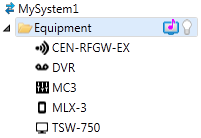
The
System Tree displays all devices
in the your system project organized by their location (optional), i.e.
the System Tree consists of folders
(locations) and devices.
Every project starts with one pre-defined location, called Equipment. The purpose of the Equipment folder is to provide the system with a default location for the control processor. You can rename the Equipment folder, and any other location you add to your system project. You can also delete any location except the location containing the control processor!
A location in your system project can be enabled as a Lighting Zone, Media Zone (3-Series only), or a Fusion Zone (3-Series only).
To add locations to the System Tree, select Add and Organize from the menu in the left pane and choose Define Locations and Zones.
To add devices to the System Tree, select Add and Organize from the menu in the left pane and choose Add Devices.
More:
Enabling a location as a Lighting Zone
Enabling a location as a Media Zone