Special Devices
Crestron
Occupancy Sensors
When a  supported
occupancy sensor is added to a Fusion Zone in Crestron Studio®, an asset
is added for it in Crestron Fusion®
to report its status.
supported
occupancy sensor is added to a Fusion Zone in Crestron Studio®, an asset
is added for it in Crestron Fusion®
to report its status.
NOTE: Crestron recommends selecting
the following logic module for the occupancy sensors in your system: GLS
Occupancy Sensor 3-Series v1.3 (cm), otherwise they will not be integrated
automatically into the Fusion Zone.
The following sensors are supported by Crestron Studio®
for automatic linking with Crestron Fusion®:
-
GLS-OIR-C-450
-
GLS-OIR-C-1500
-
GLS-OIR-C-NS
-
GLS-OIR-W-2500
-
GLS-ODT-C-500
-
GLS-ODT-C-1000
-
GLS-ODT-C-2000
-
GLS-ODT-C-NS
-
GLS-ODT-W-1200
Occupancy sensors along with any other devices that support the “Ethernet
Offline manager”/“Cresnet Poll Manager” are monitored by Crestron Studio® for online/offline
status and a critical error is reported
in Crestron Fusion®
when the device is offline.
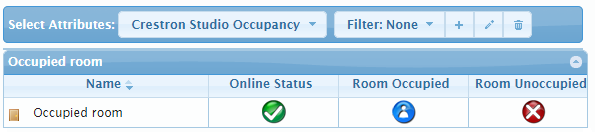
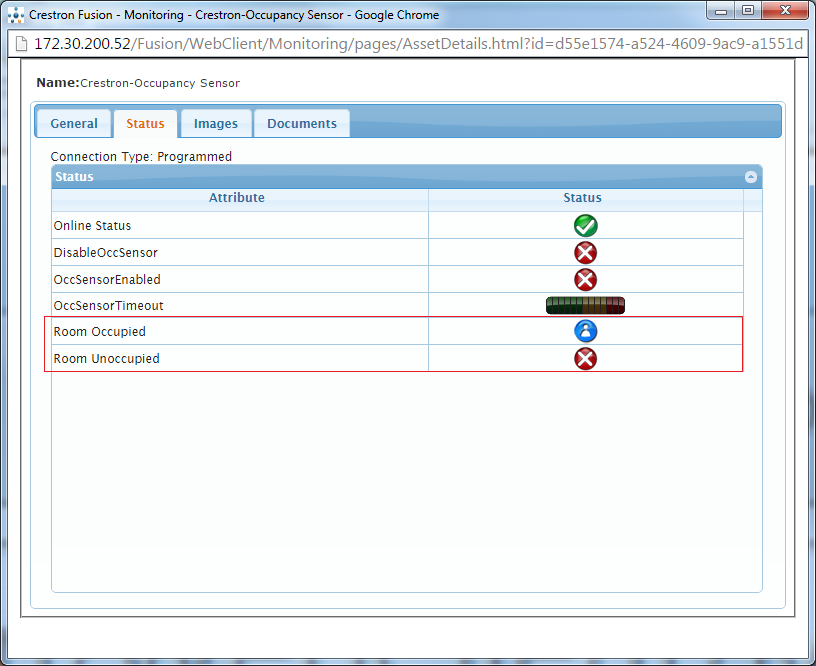
Occupancy Sensor attributes monitored in Crestron Fusion®
are:
Consult the status of each attribute in the Attribute
Status Table.
Crestron
Connected Displays and Third Party Displays
NOTE: At this time, Crestron Studio®
supports maximum of 4 media displays per Media/Fusion Zone.
As displays deteriorate and projector lamps dim as they age, it's important
to know the expected operating time (also called lamp life) of the displays/projector
lamps and to be able to monitor their actual usage. Crestron Studio®
uses an internal logic module to monitor the amount of time a media display
has been used and to determine the lamp life (in hours) of the display.
In Crestron Fusion®
display usage data for media displays is reported by the following attributes:

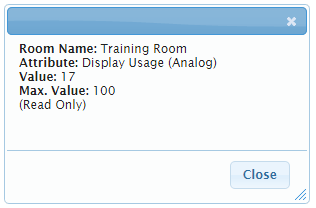
-
(Read-only)
Display Usage (if there is only
one display in the room) - reports lamp life hours for the first display
in the room.
NOTE: Display Usage ALWAYS reports
the lamp life hours of the first display, even if there are multiple
displays in the room.
- or -
-
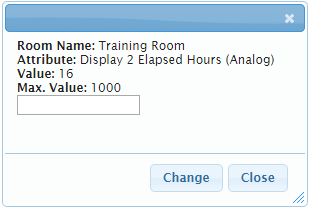
(Read-only) Display X Elapsed
Hours (if there are multiple displays in the room) - reports
lamp life hours for displays 1 to 4 respectively.
-
(Read-only)
PowerIsOn/PowerOff - reports the
power status of the device.
In Crestron Fusion®
display usage may be tracked by creating a Display Usage Tracking Report
to monitor overall usage of the display in the room or to track the total
amount of time a projector/display has been used in order to be able to
proactively schedule preventive maintenance or replace the device.