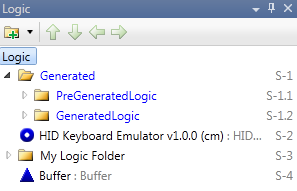
The Logic Explorer displays the symbols comprising the logic in the program. All symbols have a unique “outline number”, shown on the right side, which may change whenever the symbol order or indentation is changed. Think of the program as an outline or tree structure, with folders as the branches and individual logic symbols as the leaves.
If you have created a generated or hybrid system, then a logic folder called “Generated” is created on start, and all automatically generated logic will be placed there. You must place any logic that you have added outside of this folder, in order to guarantee that it will not be modified during any automatic program generation steps. Note that Manual or symbol-based systems do not have “Generated” logic folder.
Use the toolbar of the Logic Explorer to add new logic folders/subfolders, and to move selected symbols or logic folders up/down the program hierarchy.
|
Icons |
Purpose |
|
|
Add new logic folder/subfolder |
|
|
Move the selected item up |
|
|
Move the selected item down |
|
|
Move the selected item left |
|
|
Move the selected item right |
Note that symbols which will be excluded from compilation are marked
by the  icon. An exclamation point icon
  marks any symbols
with missing programming.
marks any symbols
with missing programming.
Any modules that are missing from your program are preceded by a green
question mark on the corresponding step in Logic
Explorer: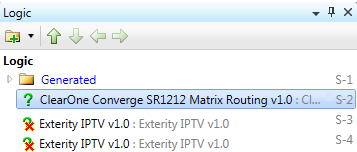
Internally incomplete modules (modules that are
properly connected externally, but internally have an issue, for example,
module, referencing an incomplete internal module ) are preceded by the
 icon:
icon: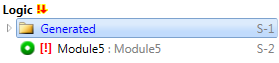
To add a symbol to the Logic Explorer:
Select the desired symbol in Symbol Library and:
double click on it
-or-
press 
-or-
drag-and-drop it in the Logic Explorer
Alternatively type the speed key name of
the symbol and press .
The newly added symbol is added before the symbol which has the focus in Logic Explorer. If the focus is on a folder, the symbol is added to that folder (at the end). The focus does not change in either case.
Note that when you add a symbol to Logic Explorer, the focus stays where it is and does NOT switch to the new addition, hence subsequent symbols get added in the right order, not reverse order.
To move a symbols to a different position in the Logic Explorer:
Select the symbol and drag and drop it to its new position
-or-
select the symbol and press 


 /
/ till the symbol is in the desired position.
More:


