Devices in Fusion Zone
Fusion-trackable devices placed into a
Fusion zone are capable of reporting to the Fusion Server without the
need of providing user-created programming. Simply add the device into
a Fusion enabled location and the Fusion Zone logic device will provide
programming which will setup the device for Fusion monitoring.
Adding a device to a Fusion zone:
-
Locate the device in the Product
Browser
-
Drag and drop it to the desired Fusion-enabled location in the
System Tree
-or-
Select the location and double click on the device.
-or-
Point to the Plus Sign  icon to the left of the device's Model Name so it turns green
  and click on it.
 What are hidden Fusion Static Assets?
 A hidden Fusion Static Asset is automatically added to the slot of the
Fusion Room logic device in Crestron Studio®
for the following devices:
A hidden Fusion Static Asset is automatically added to the slot of the
Fusion Room logic device in Crestron Studio®
for the following devices:
Automatically-added Fusion assets are not displayed in the System Tree
but the Fusion Room logic device and its static assets can be observed
in the Device Explorer
in Program Designer.
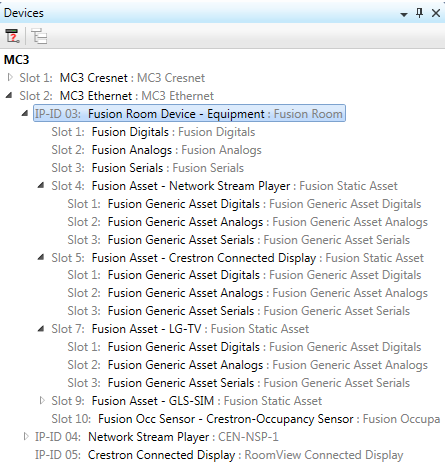
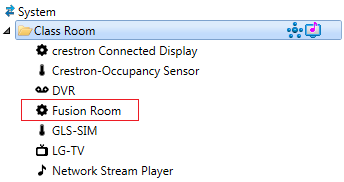
NOTE: User-added
fusion assets are visible in the System Tree:
Is a Fusion Asset added for sources in the system?
Fusion assets are not added for sources (unless the source is a Crestron
device supporting the 'Ethernet Offline Manager'/'Cresnet Poll Manager'
device extenders, for example CEN-NSP-1). Crestron Fusion®
receives information about the sources in the system through the source
routes.
What is the 'Include in Fusion' property?
Each Fusion-capable device has a 'Include in Fusion' property. When the
property is enabled (default setting for Presentation systems), the device
will be automatically integrated into the Fusion zone during program generation.
When this property is disabled (unchecked) - Crestron Fusion®
will not monitor the device.

Setting/Clearing the 'Under Fusion Control' property in the Properties
Grid for the device will have the same effect to the Fusion assets as adding/removing the device from a Fusion
room.
NOTE: This property has no effect if the device is placed in a non-Fusion
zone, unless the device is routed to a Fusion zone through source
routes.