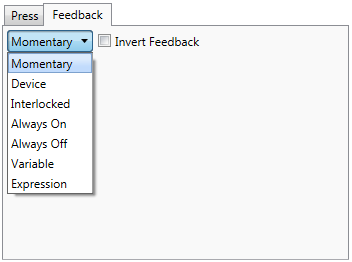
Feedback consists of visual indications about the state of the system, and is caused by the control system program telling the UI device, such as a keypad or touch screen, to respond to user input. Feedback is often used to indicate that a keypad or touch screen button has been pressed, or that a device is in a particular state, e.g. turned on, or playing. Feedback on a keypad usually consists of turning on the LEDs associated with the appropriate key, but might also include setting the value of a bar graph, or making a sound. Feedback on a touch screen usually consists of setting a button to its active state, or highlighting an icon.
The Programming Editor allows you to set the feedback for any object that can initiate programming actions, if it also supports visual feedback, such as a keypad key or a touch screen object.
For digital inputs (e.g., on/off, 0/1, push/release), the following types of feedback are available:
Momentary- The digital feedback will be high while the button or keys pressed, and return to low when it is released.
Toggle (only available for Toggle button model) - With each press of the button the feedback will alternate between the high and low state.
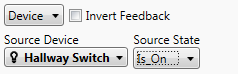
Device-
This feedback type links the button's feedback directly to a controlled
device in the project. That is, the feedback is based on the state
of the device.
Interlocked- This feedback
type can be used to latch the feedback of buttons defined in abutton group . Interlocked
feedback can only be assigned to buttons in a button group. The button
will have active feedback (for example, LED will be lit) when the
button is pressed; the feedback will remain active until another button
in the button group is pressed, at which point it will turn off. In
most cases, all the buttons in a button group should have interlocked
feedback, so that only one button's feedback will be active at a time.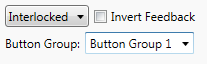
Always On- The button's feedback is always active (for example, LED is always lit).
Always Off- The button's feedback is always inactive (for example, LED is never lit).
Variable - This
feedback type assigns a value or programming source to
an interface element (for example, keypad button) to display at runtime.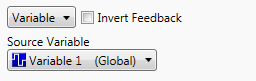
Momentary + blink on timeout (only available for Multi-Press button model) - The Multi-Press button will generate momentary feedback each time the button is pressed. When the timeout event occurs, the feedback will blink once.
Expression - This feedback
type is only available for digital join feedback. 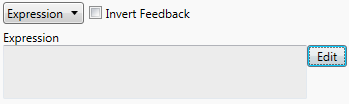
Click the  button to show the Conditional Editor and define the desired conditional
expression.
button to show the Conditional Editor and define the desired conditional
expression.
The expression you have defined will be shown in the text box to the
left from the button:
Feedback can also be inverted. To invert feedback select the Invert Feedback check box (buttons that do not provide real-time feedback do not have this option) which means the feedback is in the opposite digital state of the standard feedback logic. For example, if ordinarily the feedback (Momentary feedback) will go high whenever the button is pressed, with the Invert Feedback check box selected the feedback will be high whenever the button is not being pressed. Note that any feedback type can be inverted.