Presentation vs Home Systems
What is the difference between Presentation
and Home System. When to chose presentation system?
Presentation systems are more geared towards
commercial projects (for example, when building a project consisting of
multiple rooms with advanced AV capabilities) while Home systems are better
suited for residential settings. When you choose to create a presentation
system Crestron Studio®
will:
-
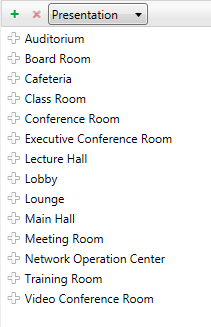
Display by default the list of
predefined Presentation locations in the Locations
& Zones section of System
Designer:
 .
.
-
Enable Fusion Zone and provide
Fusion support automatically when adding new location to the system
-
Default to presentation touch screen
templates
-
'Include in Fusion' check box is
selected for Fusion trackable devices
NOTE: Crestron Studio®
will save the system type that was chosen and recall it in the next sessions
of the application.
Can a presentation system be switched
to home system and vice versa?
No. Once selected the system type CANNOT
be changed.
Is it possible to use presentation touch
screen templates in a home system or vice versa?
Yes, it is. To change to a different type
of template:
-
Select
a touch screen in the System
Tree
-
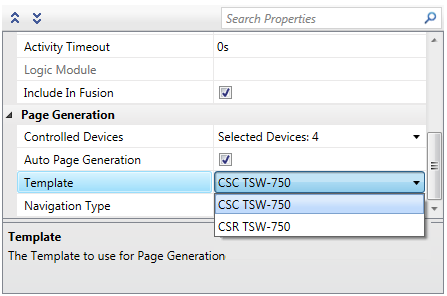
In
the Properties Grid for the
touch screen click on the Template
property drop down box:
-
Select
the desired template.
You'll have to re-generate the template pages after changing the template. Any
template pages from a previously generated template will be deleted.