
When a location is enabled as both Media
and Fusion ZoneCrestron Studio®
automatically adds the following custom attributes for control and monitoring
in Crestron Fusion®:
Digital:
(Two way) Mute Room – allows the user to see whether the room is muted or not and to toggle the displayed room state.
Analog:
(Two way) Room Volume
– displays the current volume and allows the user to set custom volume.
The default volume value range is set to 0 - 65535, but the range can
be customized by specifying new maximum value (for example, 100 to
limit the room volume between 0 and 100) by setting the Volume
Upper Bound property for the Fusion Zone: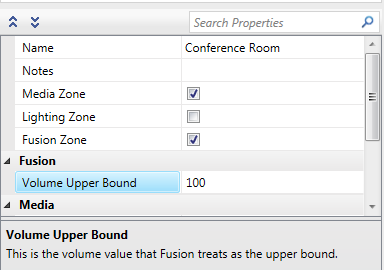
and then in Crestron Fusion®
configuring the Room Volume
attribute to have a range of 0-100: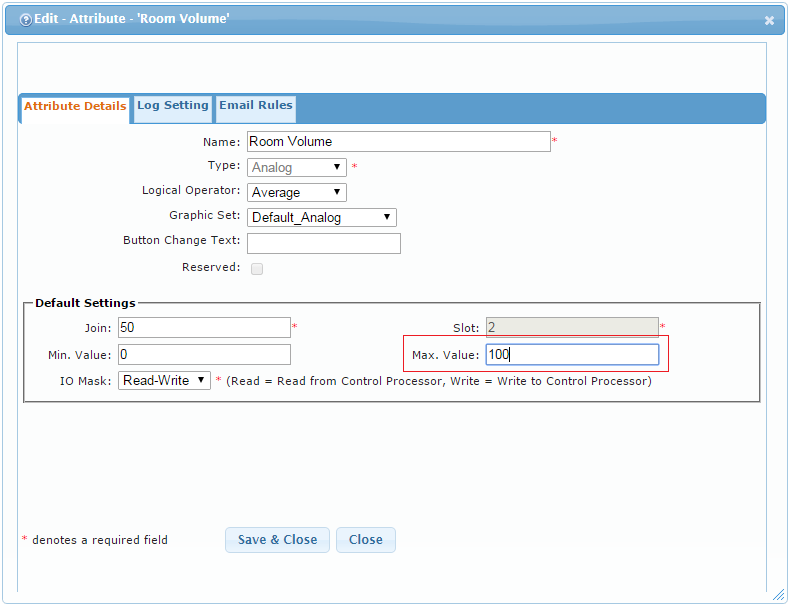
(Read-only) Display X Elapsed Hours (where<X> is a number between 1 through 4) - Displays the lamp hours of the connected displays 1 through 4, in hours. Cannot be modified by user.
Serial:
Additional attributes that Crestron Studio® programs automatically for a Fusion Room Device:
(Two way) System Power – tied to the Media Zone's 'Room Is On' information. Turning System Power on or off in Crestron Fusion® triggers the Media Zone Room's on/off module input in Crestron Studio®.
(Two way) Display Power
- reports true if any of the displays in a room is On.
If the device is a Crestron Connected Display or any display that has
a module supporting real power status and control, full control over
the display is available and turning off this value in Crestron Fusion® turns off
ALL displays in the room; turning it on turns on ALL displays in the
room.
If the display is a third-party IR device and "real power control"
is not possible, Crestron Studio®
wires the attribute up to the Media Zone’s Video Endpoint ON/Off logic
hence modifying this attribute in Crestron Fusion®
turns on/off only that display.
(Read-only) Display Usage – reports the hours usage (elapsed lamp life) of the first display in the room. If there are more than one displays in the room, the custom analog Display X Elapsed Hours attributes should be used. Displayed in Crestron Fusion® as a bar graph.
(Read-only) Display X Elapsed Hours - reports the hours usage (elapsed lamp life) of the X-th display in the room.
Additionally, Crestron Studio® automatically programs the following Asset specific attributes in Crestron Fusion®:
All devices:
Display Devices:
(Two way) PowerIsOn/PowerOff
– Attempts to integrate the actual power feedback and control
for the display via its logic module. If the device is a Crestron
Connected Display or any display that has a module supporting
real power status and control, full control over the display is
available and modifying the PowerIsOn/PowerOff
attributes in Crestron Fusion® affects
the ON/OFF status of the display.
If the display is a third-party IR device (for example, Sony TV)
and "real power control" is not possible, Crestron Studio® wires
up to the Media Zone’s Video Endpoint on/off logic, which is based
on the On/Off commands sent, not the actual On/Off status from
the device.
Occupancy Sensors: