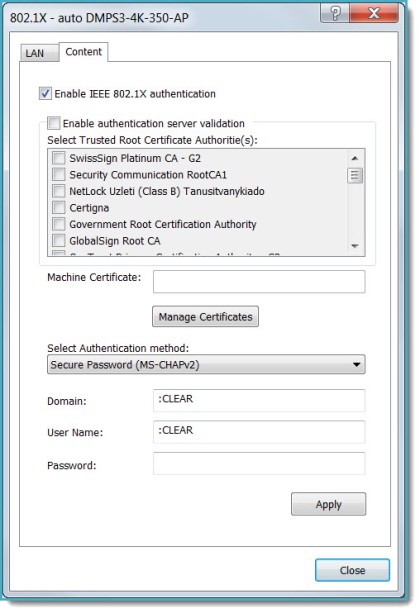
802.1X is an IEEE network standard designed to enhance the security of wireless and Ethernet LANs. It is widely used in corporate networks to provide an authentication mechanism for devices wishing to connect to the network. The standard relies on the exchange of messages between the device and the network's host, or authentication server.
3-Series devices such as the MC3 (requires firmware v1.003.0007 or later) have built-in support for the 802.1X standard, allowing communication with the authentication server and access to protected corporate networks.
To configure the 3-Series device for 802.1X
Select the Enable IEEE 802.1X authentication check box. This will enable all the options on the 802.1X dialog.
Select the Validate server certificate... check box to enable the 3-Series device to verify the identity of the network's authentication server. Selecting this option will enable the list box of certificates signed by trusted CAs (Certificate Authorities), used during server validation.
The Validate Server check box can be selected or not based on the recommendation of the network administrator, but the option should be enabled for most applications.
Select the authentication method: Certificate or Secure Password, according to the network administrator's requirement.
If Certificate is the selected authentication method, click Manage Certificates to upload the required machine certificate to the 3-Series device—see Security Certificates.
The machine certificate is an encrypted PFX file that will be supplied by the network administrator, along with the certificate password. The machine certificate is used to verify the identity of the 3-Series device. Upon installing the machine certificate, the filename will be displayed in the read-only Machine Certificate field.
-or-
If Secured Password is the selected authentication method, enter the user name and password supplied by the network administrator into the User Name and Password text fields. The Password method does not require the use of a machine certificate, only the user name and password credentials.
If the Validate Server check box was selected, this will enable the list box of certificates pre-loaded into the 3-Series device, signed by trusted CAs.
Select the check box next to each CA whose certificate can be used for server validation, as specified by the network administrator.
If the network does not use any of the listed certificates, the network administrator will provide their own certificate, which must be uploaded to the 3-Series device manually, via the Manage Certificates function. (If the certificate is self-signed, it must be saved to the Root store; if not self-signed, the Intermediate store—see Security Certificates.)
If required, type the domain name of the network in the Domain field.
When the 802.1X settings are configured the way you want, click Apply. This will save the changes to the device, and reboot the device.
Click Close to close the dialog.
Streaming devices, such as the DMPS3-4K-250-C and the DMPS3-4K-350-C, have an additional Content tab on 802.1x dialog box.
Each tab's Apply button must be pressed to apply its respective settings.