Click
Manage Quick Functions on
the Tools menu: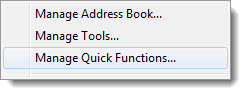
Select
the check box next to the applicable function(s):
To assign
a keyboard shortcut select the key from the Hot
Key (Alt-#) list: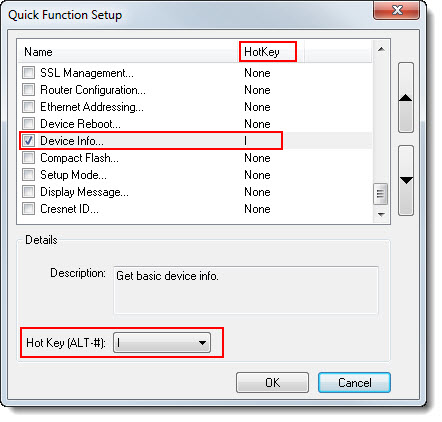
When finished, press the OK button.
The Quick Function Setup feature allows you to set up a list of frequently-used functions that can be quickly access from any tool and assign keyboard shortcuts to these function
To assign quick functions and keyboard shortcuts (from any tool)
Click
Manage Quick Functions on
the Tools menu:
Select
the check box next to the applicable function(s):
To assign
a keyboard shortcut select the key from the Hot
Key (Alt-#) list:
When finished, press the OK button.

Toolbox is pre-configured with three quick functions and keyboard shortcuts:
Firmware (Alt+O) - Updates the device firmware.
SIMPL Program (Alt+P) - Sends a SIMPL program to the control system.
Project (Alt+T) - Sends a VT Pro-e project to the touch screen.
You can always change or remove the pre-configured quick functions.
 Quick functions can be called up from any tool, and are always visible
regardless of whether the connected device supports that functionality
or not. If the current device does not support a quick function, then
calling the function will generate an error message.
Quick functions can be called up from any tool, and are always visible
regardless of whether the connected device supports that functionality
or not. If the current device does not support a quick function, then
calling the function will generate an error message.