EWS Autodiscovery in Crestron Fusion 9.2
In Crestron Fusion® software 9.2, limited support is provided for Exchange Online (as well as its predecessor, Office 365® software). In order to support this, a new method of doing EWS Autodiscovery was implemented. Autodiscovery (AD) is the process whereby a program determines the proper URL for calling EWS simply from the SMTP address.
Prior to Crestron Fusion 9.2, an earlier programming method was used for calling AD by constructing a URL for the AD call itself from the SMTP address. Crestron Fusion also provided a configuration parameter, AutoDiscoveryList (discussed below), as an alternative whereby the AD URL could be specified via the Configuration Web Client. This was useful at sites where the required DNS entries for EWS and AD were not present or incorrectly configured.
In Crestron Fusion 9.2, the newer EWS Managed API is called. This involves a call to a Microsoft API function which provides the EWS URL simply by passing the SMTP address as a parameter. Crestron Fusion has no control over which AD URL is used by this function call.
While the newer Managed API call is the preferred method for doing AD, it is necessary to retain the original method for use in cases where the DNS entries have not been properly established. The method used is controlled by a new configuration variable that is described below. It also has an impact on Exchange Online support that is affected by a second configuration variable.
Configuration Variables
Crestron Fusion 9.2 provides two variables that need to be considered in your Exchange environment. Both of these configuration variables are only available via the All Config page on the Configuration Web Client.
EWSIsHosted
This BIT (Boolean) value indicates whether EWS is running in Exchange Online or in an on‑premises Exchange. Set this value to 1 (true) if EWS is in Exchange Online (or Office 365), otherwise it should be set to 0 (false). The default value for a new Crestron Fusion database is false.
EWSUseOldAD
This BIT (Boolean) value indicates whether Crestron Fusion uses the old or the new AD method. Set this value to 1 (true) to use the older method, and 0 (false) to use the newer, Managed API method. The default value for a new Crestron Fusion database is false.
AutoDiscoveryList
Another variable which needs to be noted is AutoDiscoveryList. This is a string setting that contains one or more AD URLs to be used with the old AD method. If there is more than one URL, each must be separated with a pipe (|) character. Unlike the two previous variables, this can be set outside of the All Config page, in this part of the Configuration Web Client.
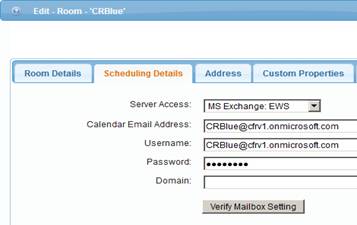
The following should be noted about these variables:
- They are system‑wide, so there is no way to set up a database where some rooms are in Exchange Online and others are in an on‑premises Exchange, and there is no way to use a mixture of old and new AD methods.
- Setting the AutoDiscoveryList variable has no effect if EWSUseOldAD is set to false.
- Not all combinations of the two EWS variables are valid. The table below describes their interactions.
