Automation
Room automation optimizes room-level environmental settings and energy usage in accordance with room occupancy, calendar events, and user-defined needs. Room automation allows the user to control and automate the lighting, shades or drapes, HVAC, and AV equipment.
For example, a calendar event schedules a conference room for a multimedia presentation. This conference room can be fully automated: the lights can be dimmed, the shades closed, and the AV equipment powered on all automatically on the date and time of the schedule presentation. Furthermore, the HVAC can be adjusted to ambient level when the room becomes occupied based on occupancy sensor feedback or when the meeting starts based on date and time. Any networked device can be controlled and automated.
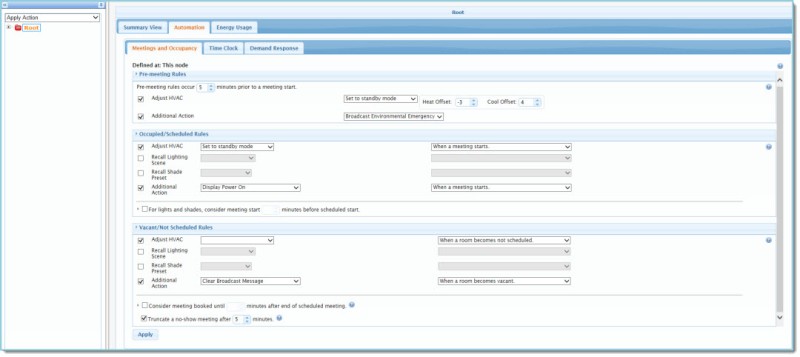
The left pane contains a tree of rooms and nodes in the enterprise or organization. The Automation tab in the Energy Management pane automates all room-level environmental, HVAC, lighting, and occupancy settings.
Select the Automation tab to view the following settings:
| Automation Tabs | |
|---|---|
|
Meeting and Occupancy: Sets Premeeting, Occupied/Scheduled, and Vacant/Not Scheduled rules. |

|
Time Clock: Sets Time Clock events driven by time of day and the Event Calendar. |
|
Demand Response: Permits you to control lighting, adjust HVAC temperature setpoints, and execute an additional action when a Demand Response Event is active. |