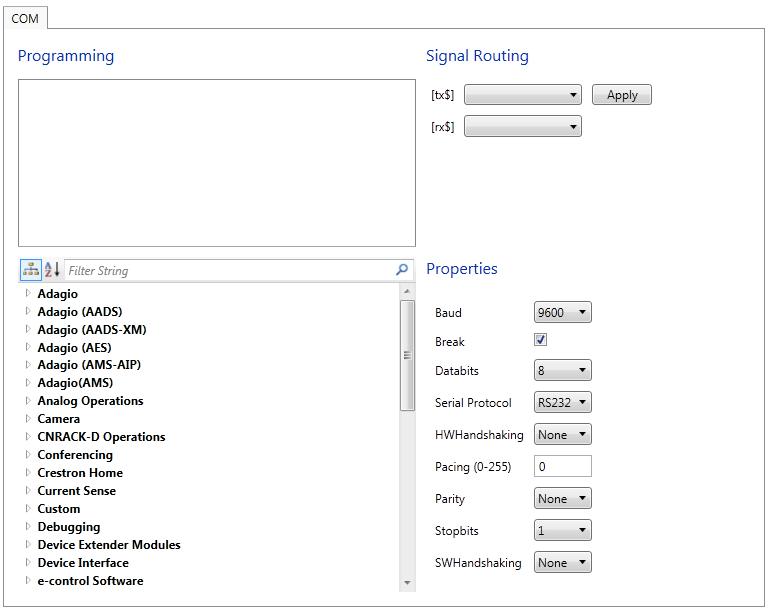
Select a module from the bottom left pane and double click on it to add the module to the Programming Pane on top. Most User Devices are represented by a single module, however more complex representations are possible. A module may be referenced by multiple devices in the Symbol Library, and it can possibly be deleted. Attempting to add a device to a program for which referenced module no longer exists (for example have been deleted) will result in an error.
Configure the transmit and receive lines:
Choose the strings that the control processor will send to the device in the [tx$] drop down list. The <tx$> input can be used to transmit strings that come from logic in the logic module.
Select the strings that the device will send as feedback to the processor in the [rx$] drop down list. The <rx$> string will also be compared to each <str#> parameter and if a match is found, this will drive the corresponding <out#> output high.
Note that incoming serial data will be used for string comparison even if <rx$> is not defined. Thus it is only necessary to define <rx$> to route strings to other logic in the program.
Select the device's serial communication settings:
Baud rate (speed of transmission) - Baud rate is the speed of data transmission expressed as the number of times condition of the line changes. Devices must operate at the same baud rate to be able to communicate with each other. Baud rates may be one of the following possible rates: 300, 1200, 1800, 2400, 3600, 4800, 6100, 7200, 9600, 14400, 19200, 28800, 38400, 57600, and 115200. Specify the baud rate of the device.
Break - When enabled, Break statement is generated for as long as the signal is held high.
Number of data bits - Data bits are a group of 5 to 8 bits representing a single character of data for transmission. Data bits are preceded by a start bit and followed by an optional parity bit and one or more stop bits. Select the number of data bits (7 or 8) the device requires.
Hardware handshaking (HWHandshaking) - Hardware handshaking is an exchange of signals over specific wires in which each device indicates its readiness to send or receive data. Select the hardware handshaking - None, RTS (Request To Send), CTS (Clear To Send) or RTS/CTS (Request to Send / Clear to Send) the device requires.
Pacing (in units of milliseconds) - Some devices require line pacing, or pauses between characters during transmission. Entering 0 or any non-numeric character turns off the pacing.
Parity - Parity checking is an error checking procedure in which the number of 1 must always be the same (either odd or even) for each group of transmitted data. Before a serial transmission can take place, parity must be agreed between the sending and receiving party. Select the setting for parity checking—N (None), E (Even), O (Odd), or Zero Stick (Parity bit always 0) that the device requires.
Number of stopbits - The stop bit signals the end of a character when using asynchronous transmission. Select the number of stop bits (1 or 2) the device requires.
Software handshaking (SWHandshaking) - A software handshake is a software protocol used to control data flow. XON/XOFF handshaking may be supported by specifying XON used to restart the transmission (for both transmit and receive), XONR (for receive only), or XONT (for transmit only). Select the software handshaking - None, XON, XONR or XONT the device requires.
Press Apply to save the COM transport settings.