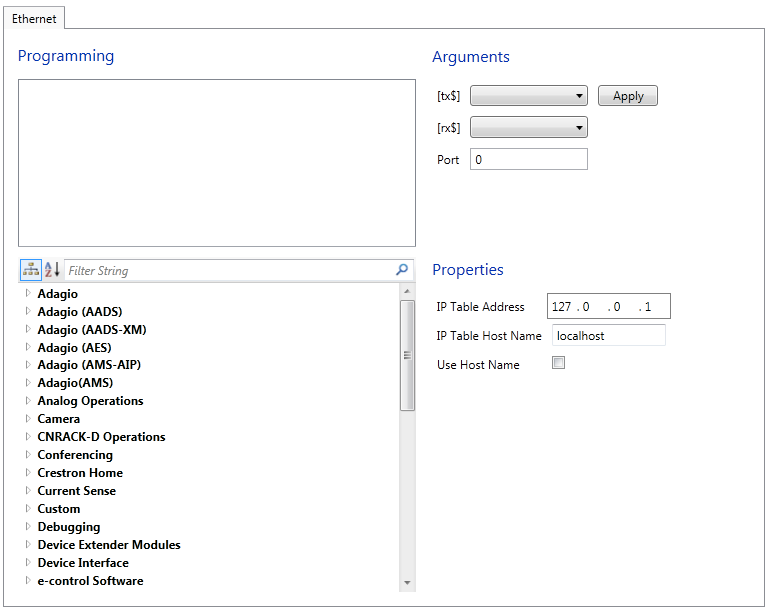
Select a module from the bottom left pane and double click on it to add the module to the Programming Pane on top. Most User Devices are represented by a single module, however more complex representations are possible.
Configure the transmit and receive lines:
Choose the strings that the control processor will send to the device in the [tx$] drop down list. The <tx$> input can be used to transmit strings that come from logic in the logic module.
Select the strings that the device will send as feedback to the processor in the [rx$] drop down list. The <rx$> string will also be compared to each <str#> parameter and if a match is found, this will drive the corresponding <out#> output high.
Specify:
Port # in the Port text field , which specifies the port connection information.
Connect:
IP Table Address: The IP Table is an internal table that contains the IP IDs and IP addresses of all Ethernet devices on the network.
IP Table Host Name: The hostname identifies the control system on the network and is automatically translated into the numerical IP address. The hostname can consist of up to 64 characters. Valid characters are 0 – 9, A – Z (not case-sensitive), and the dash (hyphen character). No other characters are valid. The hostname cannot begin with a dash or number.
Provided IP Table Host Name will be used if the Use Host Name check box is selected.
Press Apply to save the setting.