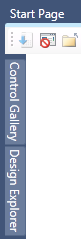
Most tool windows support an Auto Hide feature - the ability of the tool window to "slide" out of the way and only show a tab at the edge of the application window. When a window is auto-hidden or "pinned", its name appears on a tab at the edge of the application.
Note: Tool windows that are "pinned" may temporarily slide into view when the window has focus. To hide the window again, select an item outside of the current window. When the window loses focus, it slides back out of view.
To "pin" a tool window:
Point to the down arrow (on the right side of the title bar of the tool window) and choose Auto Hide from the options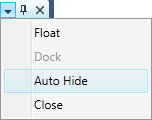
-or-
As an alternative, click the pushpin icon  on the title bar of the tool window. Note that by using this method you will pin all tool windows in the group (if any).
To "un-pin" a tool window:
To un-pin a tool window, point to its tab so the tool window slides back into view then point to the down arrow (on the right side of the title bar of the tool window) and choose Dock from the options
-or-
Click the pushpin icon  on the title bar of the tool window. Note that by using this method you will un-pin all tool windows in the group (if any).