Point to the Viewmenu in the main toolbar of Crestron Studio®: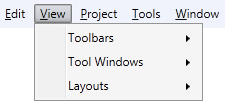
Point to the tool window you wish to display and click on the checkbox next to its name
A checkmark  appears indicating that the tool window is open/visible.
To open a tool window follow the instructions below:
Point to the Viewmenu in the main toolbar of Crestron Studio®:
Point to the tool window you wish to display and click on the checkbox next to its name
A checkmark appears indicating that the tool window is open/visible.
To close a tool window:
Point to the tool window you wish to close to bring it to focus and press 

 .
.
-OR-
Point to the Viewmenu in the main toolbar of Crestron Studio® and selectTool Windows.
Point to the tool window you wish to close and click on the checkbox next to its name to make the checkmark disappear.
To toggle open/close all visible tool windows:
Press 
 (Backtick) to hide all visible tool windows. To see them again press (Backtick) once again.