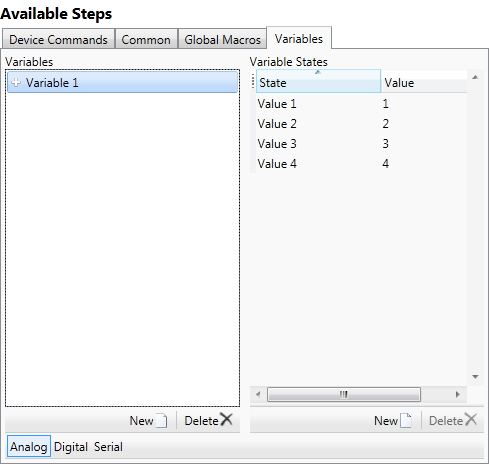
Any pre-existing variables created in systems prior to CS 1.40 are automatically designated as “Global”
A variable allows you to assign digital, analog and serial values to pre-defined variable states, which can be set from anywhere in the program. For example, if you want your HVAC system to behave differently if you are away, or home, or home but sleeping, you could create a variable called “HVAC State” and define its values as Away, Home, and Sleeping. You must set the variable to the appropriate state when certain events are triggered, e.g. by timers or actions. You may then test the state of the variable in a Conditional statement that selects different paths of action based on whether the status.
To define a global variable
Select the variable type by clicking the corresponding button: Analog, Digital or Serial.
Click the New button under Variables.
This will add a new variable (named sequentially starting at "Variable
1") with two default states (Value 1 and Value 2) and corresponding
values.
The default values for Analog and Serial variables are 1 and 2. For
a Digital variable, the default values are False (0) and True (1).
If desired select the variable from the Variables list and press F2 to rename it to something meaningful, e.g., "ProjectorStatus". variable names cannot start with a digit or the following special characters '$', '_' (underscore). Additionally, a variable name cannot contain: '\', ',', ':', ';', '"'.
For analog and serial variables, you can add as many variable states as required by clicking the New button under Variable States. The New button is not enabled for digital variables, which can only have two states.
To edit the state name or value, select the item and press F2.
For analog and serial variables, enter the value in the State Value field. An analog variable can have values from 0d to 65535d. A serial variable can have any unique text value (numeric or character). The State Value field cannot be edited for digital variables, which can only have two possible values, 0 and 1.
To delete a variable (or variable state)
Select the variable (or variable state) and click  . (Digital variable states
cannot be removed.)
. (Digital variable states
cannot be removed.)
When the logic program is uploaded to the processor, all variables are initialized to zero. After the system is uploaded the processor stores the variables in NVRAM and recalls the latest values if the system reboots.