to enable the synchronization feature.
Any Button model that provides more than one programmable event (Toggle, Press/Release, and Multi-Press) allows the events to be synchronized.
When the chosen button model can be synchronized, a Synchronize
Events check box appears to the right of the button model drop
list box,
to enable the synchronization feature.
Note that if you program multiple steps that target a single device, only the first step will be synchronized!
When you synchronize events, for every event other than the one you are working with will be assigned an alternate action. For example the alternate action of an "On" command, is "Off" and vice versa. In cases where the action has no clear alternate, the alternate action will be "Unaffected."
For example, if you assign the command "Conference Room single lighting ON" to the Press 1 event of a Toggle button, the command "Conference Room single lighting OFF" will be automatically assigned to the Press 2 event.
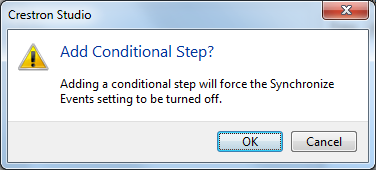
Note that conditional steps are not allowed within synchronized events and Crestron Studio® will warn you that adding a conditional step will turn off synchronization for the entire button: