In the Design and Program section choose Advanced Programming.
Click
on the Program Global Macros
tab to display all currently defined global macros: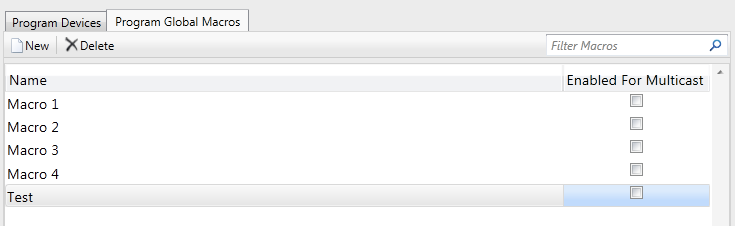
Select
the desired global macro and click on the Enabled
For Multicast checkbox:
Multicast refers to additional logic built during program generation that enables a global macro's name to be broadcasted over the Ethernet network. Any control system (including the broadcaster) that receives the broadcast will extract the name of the global macro and execute a macro with an identical name.
Note that the "Enable Multicast" option MUST be enabled for a specific global macro in all programs that should respond to broadcasts.
Whenever Crestron Studio® issues a command for the global macro, the same command will be triggered on any additional control systems residing on the same network that contain a multicast-enabled global macro with an identical name (case-insensitive). Similarly, any action commands issued by the other control systems for a multicast-enabled global macro with the exact same name (case-insensitive), will trigger the same command in the local control system.
The Multicast feature allows for programs created in SIMPL, D3 Pro, SystemBuilder™, and Crestron Studio® to all work together integrating custom logic, complex lighting features, and audio/multimedia zone features.
To enable the multicast feature for a global macro:
In the Design and Program section choose Advanced Programming.
Click
on the Program Global Macros
tab to display all currently defined global macros:
Select
the desired global macro and click on the Enabled
For Multicast checkbox:
More: