Making a Network Folder Available Offline
If you wish to work with folders on a network, first you have to make
the folders available offline.
Note that while the method described below will allow you to start Crestron Studio®
if a network drive is a part of Crestron Library you
won't be able to create a project on a network drive at this time!
Note
that while the method described below will allow you to start
Crestron Studio®
if a network drive is a part of Crestron Library,
creating
a project on the network drive is not supported at this time! |
To make a network folder available offline,
follow the steps below:
While connected to the network, browse
to the network folder location that you want to make available offline,
or create a new one
Right click on the network folder, and click on Always
available offline to check it
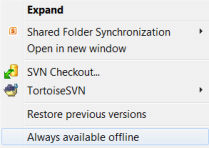
A process will start, synchronizing your network folder.
After the syncronizing process is
over, the selected network folder will display the Sync icon on it signifying that this folder is available
offline,
Now your network folder is available offline.
Note:
To make your network files available offline this method actually copies
all network files locally, so disk space might be a consideration!